
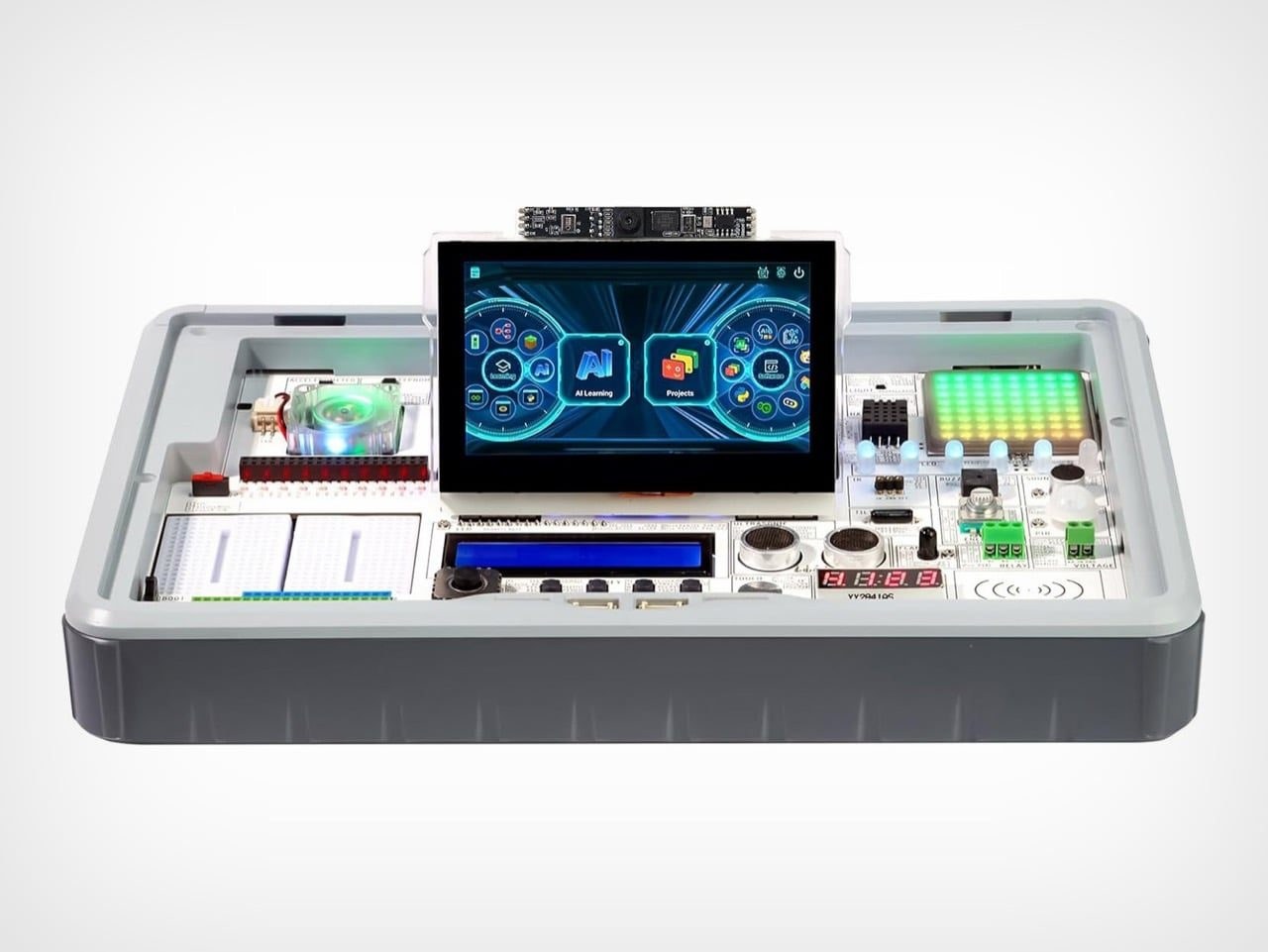
 lecrow’s CrowPi 3 is a Raspberry Pi 5 learning station equipped with 41 built-in sensors and modules, a camera, a microphone, and a 4.3-inch touchscreen. Remember those old project kits with spring terminals where you bent wires into a working radio and felt like a genius? Elecrow’s CrowPi 3 updates that exact feeling for an era where children want to build chatbots instead of crystal sets. The curriculum ranges from blinking an LED to face recognition and voice control, alongside hooking up large language models like ChatGPT, Gemini, and DeepSeek. Children already talk to artificial intelligence all day, so Elecrow figured they might as well build one.
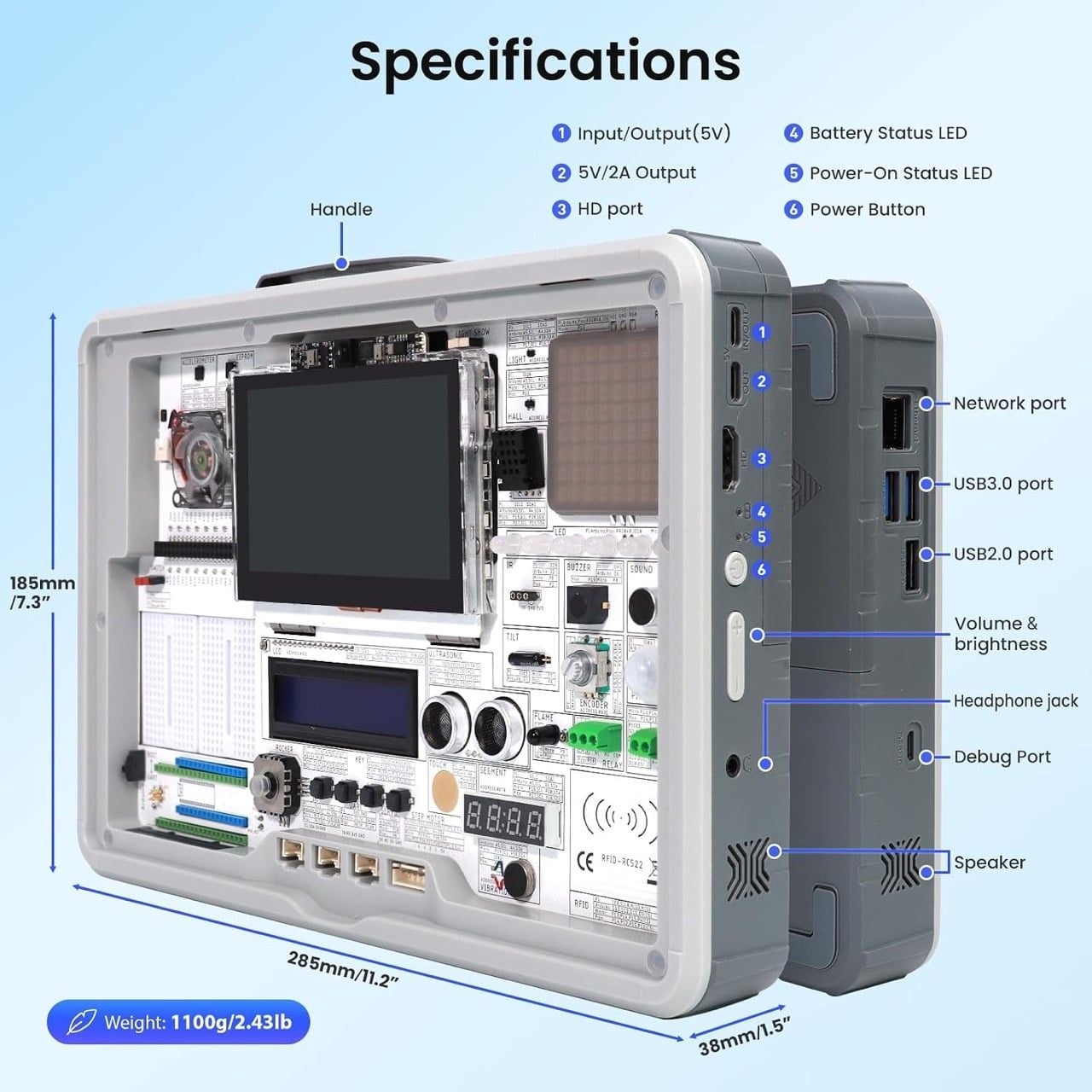
The unit measures 11.2 by 7.3 by 1.5 inches and weighs 2.43 pounds, coming in at roughly the heft of a hardcover textbook. The CrowPi 3 ships in a bumpered gray briefcase featuring a frosted magnetic lid, a fold-out handle, and an orange pull tab, making it the friendliest cyberdeck you can buy off the shelf. For the uninitiated, a cyberdeck is a custom computer built into a rugged container, usually powered by a single-board computer and wrapped in sci-fi aesthetics. Most builders spend weekends 3D printing and swearing to assemble one, whereas this kit arrives finished. The faceplate carries silkscreened labels and pin numbers, so the board doubles as its own wiring diagram. A middle schooler can carry the whole setup onto a school bus, and as CNX Software noted in December 2025, the hardware layout bridges the gap between raw components and plug-and-play electronics.
Every module gets its own labeled cell, meaning the ultrasonic sensor, buzzer, tilt switch, RFID reader, and flame sensor sit in plain view rather than hiding behind a plastic lid. That layout is arguably the best teaching decision in the box, allowing a learner to point directly at the part they just coded and watch it react. Two breadboards on the left handle custom circuits, while a Raspberry Pi Pico, Arduino Nano, or micro:bit can join the main board. Elecrow calls the design open source, with supporting resources hosted on GitHub.
A Tiny Screen, a Noisy Fan, and 180 Lessons
The touchscreen is the sole moving part on the faceplate, folding flat or flipping forward for a better viewing angle. A 2-megapixel camera sits on a small bar above it like a laptop webcam, positioned squarely where a facial-recognition tutorial needs it. At 800 by 480 pixels and 300 nits, the display suits status readouts and debugging, though an IT’s FOSS reviewer pointed out that the custom learning interface does not always render properly at that resolution. A full-size HDMI port solves the limitation by letting an external monitor take over once serious coding begins. The RGB cooling fan drew complaints as well for being loud and constantly spinning, though the same reviewer dryly suggested silencing it as a free coding exercise.
Elecrow says there are 180+ lessons in total, which is a lot of homework disguised as fun.
The curriculum covers OpenCV image processing, object tracking, face recognition, QR code reading, pedestrian and vehicle detection, and speech recognition. Elecrow claims over 180 lessons in total, which constitutes a mountain of homework disguised as a toy. The large language model tutorials connect the board to ChatGPT, Gemini, and DeepSeek; because a Raspberry Pi 5 cannot host models of that scale locally, those lessons rely entirely on online cloud services. Elecrow’s project ideas lean toward the practical and amusing, such as a voice-activated night light or a piggy bank that recognizes coins and plays a sound for each deposit. There is even a Minecraft course where tapping an NFC card spawns in-game TNT, which remains an efficient way to smuggle Python programming into a weekend.
Store Shelves, Rival Kits, and the Real Cost
Raspberry Pi’s own official keyboard computer answers a simpler question: what if the entire machine lived inside a keyboard housing? For $200, you get 16GB of RAM, mechanical keys, and a 256GB solid-state drive, making for a fine desktop setup but a poor science fair project. It lacks joysticks, ultrasonic sensors, and flame detectors—the exact physical inputs children actually want to poke. The closest direct rival is the Joy-Pi Advanced, a Raspberry Pi 4 kit that TechRadar tracked above $470 during comparisons with the CrowPi pricing. The CrowPi 3 wins by selling the tactile thrill of physical wiring.
The original CrowPi hit Kickstarter in 2018 with a Pi 3B+ and a carry case, and the CrowPi 2 eventually crammed over 22 sensors into the chassis. The CrowPi 3 nearly doubles that count while adding artificial intelligence modules alongside Pico and micro:bit support absent from earlier iterations. Makers who build custom briefcase computers from scratch will immediately understand the appeal of skipping the modeling and wiring marathon. The sensors arrive pre-wired and the lessons come pre-written, which is a fair trade when the user at the desk is eight years old.
Elecrow sells two distinct packages, and the price gap between them comes down to whether you supply your own computer board. According to market data from late 2025, the Basic Kit retailed around $229 on Elecrow’s storefront, while the Advanced Kit reached $439 directly and up to $599 on Amazon. The Basic Kit assumes you already own a Raspberry Pi 5, whereas the Advanced Kit bundles a 16GB Pi 5, a wireless keyboard and mouse, two rechargeable batteries, and two game controllers. Children will spend the next decade conversing with algorithms, and the generations raised on Radio Shack kits turned out fine because someone gave them hardware to pull apart. Someone will eventually build a coin-sorting piggy bank that judges your savings, and frankly, that is a project worth backing.
Buying an integrated hardware suitcase saves months of sourcing individual parts across online marketplaces, but it demands patience for troubleshooting cloud connections right in the middle of a bedroom. You are paying for engineered convenience and saved hours, sparing parents from explaining why a hand-soldered wire keeps short-circuiting. If you need a tangible way to pull a teenager away from a phone screen in favor of physical hardware, this station delivers, but be prepared for recurring internet bills driven by constant API requests to language models.